

If you are looking for Wireless CarPlay for Tesla Model Y, the key thing to understand first is this:
👉 Tesla does NOT support Apple CarPlay or Android Auto natively
That means every solution on the market is an aftermarket adapter system that adds CarPlay on top of Tesla’s existing 15-inch screen.
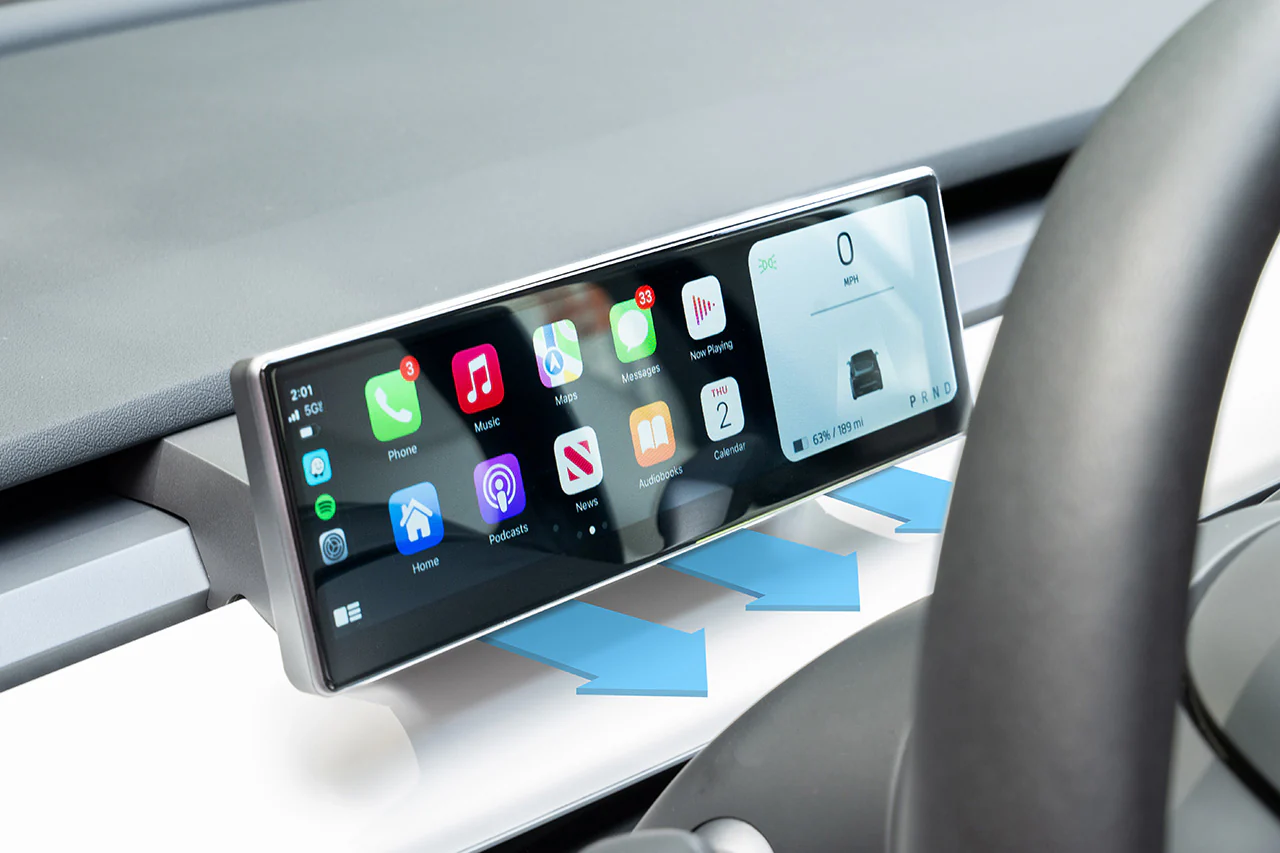
So when people say “Wireless CarPlay for Tesla Model Y”, they are usually referring to a plug-and-play CarPlay adapter box that enables iPhone mirroring and apps like:
- Apple Maps / Google Maps / Waze
- Spotify / Apple Music
- WhatsApp / Messages
- Calls and Siri
How Wireless CarPlay Works in Tesla Model Y
Most systems work in one of two ways:
1️⃣ USB Plug-and-Play Adapter (Most Common)
- Plug into Tesla USB port
- Connect iPhone via WiFi + Bluetooth
- CarPlay appears on Tesla screen
👉 No installation, no wiring changes
These devices create a wireless bridge between iPhone and Tesla display.
2️⃣ Integrated Video Interface Box (More Advanced)
- Installed behind Tesla screen system
- Full-screen CarPlay integration
- More OEM-like experience
👉 Usually smoother, but more expensive and harder to install
Best Wireless CarPlay Solution for Tesla Model Y
1️⃣ Plug-and-Play Wireless CarPlay Adapter (Best Overall)
Tesla Model Y Wireless CarPlay Adapter
This is the most popular option among Tesla owners.
Key features:
- 5-minute installation (USB plug only)
- Fully wireless CarPlay after first setup
- Works with Model Y 2020–2026
- Supports iOS apps like Maps, Spotify, Messages
- No permanent modification needed
👉 This is the easiest way to upgrade your Tesla infotainment experience
What You Get with Wireless CarPlay in Model Y
Once installed, your Tesla screen will support:
📍 Navigation
- Apple Maps
- Google Maps
- Waze (real-time traffic)
🎵 Media
- Spotify
- Apple Music
- YouTube Music
📱 Communication
- iMessage
- Phone calls (Siri support)
👉 All controlled from Tesla’s built-in touchscreen
Installation Overview
Most Wireless CarPlay adapters follow this process:
- Plug device into Tesla USB port
- Turn on WiFi + Bluetooth on iPhone
- Pair once
- CarPlay auto-connects every time you enter the car
👉 After setup, it reconnects automatically like native CarPlay
Pros and Cons of Wireless CarPlay for Tesla Model Y
✔ Advantages
- Adds Apple CarPlay to Tesla (missing feature solved)
- No phone mount needed
- Safer driving experience (apps on big screen)
- Plug-and-play installation
- Works across most Model Y versions
❌ Limitations
- Not officially supported by Tesla
- Slight delay compared to native systems
- Depends on adapter quality
- Some apps still rely on Tesla audio routing
Wireless CarPlay vs Tesla Native System
Tesla’s built-in system is still strong for:
- Energy data
- Vehicle controls
- Tesla navigation
But Wireless CarPlay is better for:
- Apple ecosystem users
- Better navigation apps (Waze, Google Maps)
- Messaging + music integration
👉 Most users use both systems together
Is Wireless CarPlay Worth It for Model Y?
✔ YES, if you:
- Use iPhone daily
- Prefer Apple Maps / Google Maps
- Want Spotify + Messages on main screen
- Don’t want phone mounts
❌ NOT necessary if you:
- Already like Tesla navigation
- Don’t use Apple ecosystem apps
- Prefer minimal third-party devices
Wireless CarPlay for Tesla Model Y is not a factory feature, but it is now easily achievable through plug-and-play adapters.
👉 The most practical solution today is a USB wireless CarPlay adapter, which turns your Tesla screen into a full Apple CarPlay interface in minutes.